<?xml version="1.0" encoding="utf-8"?><feed xmlns="http://www.w3.org/2005/Atom" ><generator uri="https://jekyllrb.com/" version="3.10.0">Jekyll</generator><link href="https://annayoon.github.io/feed.xml" rel="self" type="application/atom+xml" /><link href="https://annayoon.github.io/" rel="alternate" type="text/html" /><updated>2026-07-12T00:35:31+09:00</updated><id>https://annayoon.github.io/feed.xml</id><title type="html">Anna’ Blog</title><subtitle>Technical Writer</subtitle><entry><title type="html">빈 화면 앞의 막막함을 MCP로 옮기기 — Technical Writing Helper 개발기</title><link href="https://annayoon.github.io/technical-writing-helper-mcp/" rel="alternate" type="text/html" title="빈 화면 앞의 막막함을 MCP로 옮기기 — Technical Writing Helper 개발기" /><published>2026-07-11T00:00:00+09:00</published><updated>2026-07-11T00:00:00+09:00</updated><id>https://annayoon.github.io/technical-writing-helper-mcp</id><content type="html" xml:base="https://annayoon.github.io/technical-writing-helper-mcp/"><![CDATA[<p>테크니컬 라이팅에서 가장 어려운 순간은 문장을 다듬는 때가 아닙니다. <strong>빈 화면 앞에서 구조를 잡는 순간</strong>입니다. 어떤 타입의 문서인지, 어떤 섹션이 필요한지, 각 섹션이 무엇에 답해야 하는지 — 이 뼈대가 서기 전까지는 한 줄도 나아가지 못합니다. 반대로 뼈대만 서면 초안은 놀랄 만큼 빨리 채워집니다.</p>

<p>요즘은 초안을 LLM이 곧잘 씁니다. 그런데 LLM에게 “가이드 문서 하나 써줘”라고 하면, 그럴듯하지만 타입이 애매하고 구조가 매번 다른 글이 나옵니다. LLM은 글은 잘 쓰지만 <strong>검증된 문서 구조·팀 고유 서식·결정적(deterministic) 판정</strong> 같은 건 잘 못합니다. 그 간극을 메우려고 MCP 서버를 하나 만들어 깃허브에 올렸습니다. 이름은 <a href="https://github.com/annayoon/Technical-Writing-Helper">Technical Writing Helper</a>(<code class="language-plaintext highlighter-rouge">twh</code>)입니다.</p>

<p>포지셔닝을 한 문장으로 정리하면 이렇습니다. <strong>“글은 Claude가 쓰고, 구조·재료·출처 추적은 서버가 한다.”</strong> 이 역할 분담이 이 프로젝트의 거의 모든 설계 결정을 지배했습니다.</p>

<h2 id="왜-프롬프트가-아니라-mcp-서버인가">왜 프롬프트가 아니라 MCP 서버인가</h2>

<p>“좋은 목차 잡아주는 프롬프트” 하나면 되지 않나 싶을 수 있습니다. 실제로 해보면 세 가지가 안 됩니다.</p>

<ul>
  <li><strong>결정성</strong>: 같은 입력에 매번 다른 목차가 나옵니다. 문서 타입 판정이 LLM의 그날 기분에 좌우됩니다.</li>
  <li><strong>상태</strong>: 작년 보고서를 참조로 등록해두고 올해 초안에 쓰는 흐름이, 대화가 끊기면 매번 리셋됩니다.</li>
  <li><strong>재사용</strong>: 개인 Claude에서 잡은 규칙을 CI(docs-as-code) 파이프라인에서 똑같이 돌릴 방법이 없습니다.</li>
</ul>

<p>MCP(Model Context Protocol)는 이 셋을 정면으로 해결합니다. 규칙은 서버 코드에 결정적으로 박아두고, 상태는 서버가 파일로 들고 있고, 같은 코어를 여러 입구로 서빙할 수 있습니다. 그래서 프롬프트가 아니라 서버로 갔습니다.</p>

<h2 id="아키텍처-코어-하나-얇은-프론트엔드-여럿">아키텍처: 코어 하나, 얇은 프론트엔드 여럿</h2>

<p>가장 먼저 정한 뼈대는 <strong>코어 라이브러리 + 얇은 프론트엔드</strong>입니다. 판정·목차·검색 로직은 전부 <code class="language-plaintext highlighter-rouge">outline</code> / <code class="language-plaintext highlighter-rouge">references</code> / <code class="language-plaintext highlighter-rouge">doc_types</code> / <code class="language-plaintext highlighter-rouge">storage</code> 모듈에 있고, MCP 서버(<code class="language-plaintext highlighter-rouge">server.py</code>)와 CLI(<code class="language-plaintext highlighter-rouge">cli.py</code>)는 그걸 얇게 노출하는 껍데기입니다.</p>

<div class="language-plaintext highlighter-rouge"><div class="highlight"><pre class="highlight"><code>                    ┌─────────────┐
 Claude (MCP) ─────▶│  server.py  │─┐
                    └─────────────┘ │
                    ┌─────────────┐ │   ┌──────────── core ───────────┐
 CI / docs-as-code ▶│   cli.py    │─┼──▶│ outline · references ·      │
                    └─────────────┘ │   │ doc_types · storage · extract│
                    ┌─────────────┐ │   └──────────────────────────────┘
 DocPortal 위키   ─▶│ import twh  │─┘
                    └─────────────┘
</code></pre></div></div>

<p>덕분에 같은 규칙이 세 입구에서 똑같이 돕니다. 개인은 Claude Desktop/Code의 MCP로, CI는 CLI로, 전사 <a href="https://github.com/annayoon/docportal">문서 포털(DocPortal)</a>은 코어를 직접 <code class="language-plaintext highlighter-rouge">import</code>해서 위키 에디터의 “구조 잡기” 패널로. 나중에 원격 HTTP 서버로 전환할 때도 코어는 그대로 두고 껍데기만 바꾸면 됩니다.</p>

<p><code class="language-plaintext highlighter-rouge">server.py</code>가 얼마나 얇은지는 툴 정의만 봐도 보입니다. 로직이 없습니다.</p>

<div class="language-python highlighter-rouge"><div class="highlight"><pre class="highlight"><code><span class="o">@</span><span class="n">mcp</span><span class="p">.</span><span class="n">tool</span><span class="p">()</span>
<span class="k">def</span> <span class="nf">suggest_outline</span><span class="p">(</span><span class="n">doc_type</span><span class="p">:</span> <span class="nb">str</span><span class="p">,</span> <span class="n">topic</span><span class="p">:</span> <span class="nb">str</span><span class="p">,</span> <span class="n">audience</span><span class="p">:</span> <span class="nb">str</span><span class="p">,</span> <span class="n">reader_goal</span><span class="p">:</span> <span class="nb">str</span><span class="p">)</span> <span class="o">-&gt;</span> <span class="nb">dict</span><span class="p">:</span>
    <span class="n">types</span> <span class="o">=</span> <span class="n">_types</span><span class="p">()</span>
    <span class="k">if</span> <span class="n">doc_type</span> <span class="ow">not</span> <span class="ow">in</span> <span class="n">types</span><span class="p">:</span>
        <span class="k">return</span> <span class="p">{</span><span class="s">"ok"</span><span class="p">:</span> <span class="bp">False</span><span class="p">,</span> <span class="s">"error"</span><span class="p">:</span> <span class="sa">f</span><span class="s">"알 수 없는 문서 타입: </span><span class="si">{</span><span class="n">doc_type</span><span class="si">}</span><span class="s">"</span><span class="p">,</span>
                <span class="s">"available"</span><span class="p">:</span> <span class="nb">sorted</span><span class="p">(</span><span class="n">types</span><span class="p">.</span><span class="n">keys</span><span class="p">())}</span>
    <span class="k">return</span> <span class="n">outline_mod</span><span class="p">.</span><span class="n">suggest</span><span class="p">(</span><span class="n">types</span><span class="p">[</span><span class="n">doc_type</span><span class="p">],</span> <span class="n">topic</span><span class="o">=</span><span class="n">topic</span><span class="p">,</span>
                               <span class="n">audience</span><span class="o">=</span><span class="n">audience</span><span class="p">,</span> <span class="n">reader_goal</span><span class="o">=</span><span class="n">reader_goal</span><span class="p">)</span>
</code></pre></div></div>

<h2 id="인터뷰를-프롬프트가-아니라-툴-시그니처로-강제하기">인터뷰를 프롬프트가 아니라 ‘툴 시그니처’로 강제하기</h2>

<p>이 프로젝트에서 가장 마음에 드는 결정입니다. LLM에게 “먼저 독자를 물어보고 쓰세요”라고 지시문으로 부탁하면, 급할 때 건너뜁니다. MCP 서버는 대화를 주도할 수 없으니, 인터뷰를 <strong>파라미터로 강제</strong>했습니다.</p>

<p><code class="language-plaintext highlighter-rouge">classify_document</code>는 <code class="language-plaintext highlighter-rouge">reader_purpose</code>와 <code class="language-plaintext highlighter-rouge">audience</code>를 필수로 받습니다. 그리고 <code class="language-plaintext highlighter-rouge">reader_purpose</code>가 정해진 enum이 아니면, 판정 대신 <strong>되물을 질문 목록</strong>을 돌려줍니다.</p>

<div class="language-python highlighter-rouge"><div class="highlight"><pre class="highlight"><code><span class="k">def</span> <span class="nf">classify</span><span class="p">(</span><span class="n">doc_types</span><span class="p">,</span> <span class="n">reader_purpose</span><span class="p">,</span> <span class="n">audience</span><span class="p">,</span> <span class="n">topic</span><span class="o">=</span><span class="s">""</span><span class="p">):</span>
    <span class="k">if</span> <span class="n">reader_purpose</span> <span class="ow">not</span> <span class="ow">in</span> <span class="n">VALID_PURPOSES</span><span class="p">:</span>
        <span class="k">return</span> <span class="p">{</span>
            <span class="s">"ok"</span><span class="p">:</span> <span class="bp">False</span><span class="p">,</span>
            <span class="s">"error"</span><span class="p">:</span> <span class="s">"reader_purpose가 유효하지 않습니다. 독자에게 "</span>
                     <span class="s">"'이 문서를 읽고 나서 무엇을 할 수 있어야 하나요?'를 물어본 뒤 고르세요."</span><span class="p">,</span>
            <span class="s">"valid_purposes"</span><span class="p">:</span> <span class="p">[...],</span>  <span class="c1"># learn-by-doing | accomplish-task | ...
</span>        <span class="p">}</span>
    <span class="n">primary</span> <span class="o">=</span> <span class="p">[</span><span class="n">t</span> <span class="k">for</span> <span class="n">t</span> <span class="ow">in</span> <span class="n">doc_types</span><span class="p">.</span><span class="n">values</span><span class="p">()</span> <span class="k">if</span> <span class="n">reader_purpose</span> <span class="ow">in</span> <span class="n">t</span><span class="p">.</span><span class="n">reader_purposes</span><span class="p">]</span>
    <span class="p">...</span>
</code></pre></div></div>

<p>즉 인터뷰를 건너뛰고 바로 <code class="language-plaintext highlighter-rouge">classify_document</code>를 부르면 서버가 “그건 유효한 값이 아니니 사용자에게 물어보라”고 되받아칩니다. LLM 입장에서는 인터뷰 없이는 다음 단계로 갈 방법이 없습니다. <strong>하지 말라고 부탁하는 대신, 안 하면 진행이 안 되게</strong> 만든 것입니다.</p>

<h2 id="판정은-규칙-기반-목차는-스키마-자산">판정은 규칙 기반, 목차는 스키마 자산</h2>

<p>문서 타입 판정은 LLM의 감이 아니라 서버의 규칙으로 합니다. 기준 축은 딱 하나 — <strong>“독자가 읽고 나서 무엇을 할 수 있어야 하는가”</strong>(<code class="language-plaintext highlighter-rouge">reader_purpose</code>)입니다. <code class="language-plaintext highlighter-rouge">learn-by-doing</code>이면 tutorial, <code class="language-plaintext highlighter-rouge">accomplish-task</code>면 how-to, <code class="language-plaintext highlighter-rouge">report-official</code>이면 공문·보고서 식으로, 목적 → 타입 매핑을 서버가 들고 있습니다. 같은 입력엔 항상 같은 판정이 나옵니다.</p>

<p>내장 타입은 Diátaxis 4종(tutorial / how-to / reference / explanation)에 README, 릴리스 노트, ADR, 트러블슈팅, API 레퍼런스, 그리고 한국 실무에 꼭 필요한 <strong>공문·보고서(관공서/대내)</strong>까지 얹었습니다. 각 타입은 YAML 한 장으로 정의되는데, 사실상 이 스키마가 이 프로젝트의 핵심 자산입니다. 섹션마다 제목뿐 아니라 <strong>“이 섹션이 답해야 할 질문”</strong>과 분량 가이드가 붙습니다.</p>

<div class="language-yaml highlighter-rouge"><div class="highlight"><pre class="highlight"><code><span class="pi">-</span> <span class="na">title</span><span class="pi">:</span> <span class="s">소요 예산 및 일정</span>
  <span class="na">goal</span><span class="pi">:</span> <span class="s">자원과 시간 계획을 명시한다.</span>
  <span class="na">questions</span><span class="pi">:</span>
    <span class="pi">-</span> <span class="s">예산의 산출 근거는 무엇인가?</span>
    <span class="pi">-</span> <span class="s">단계별 일정과 책임 주체는 명확한가?</span>
  <span class="na">length_hint</span><span class="pi">:</span> <span class="s">표 권장</span>
  <span class="na">optional</span><span class="pi">:</span> <span class="no">true</span>
</code></pre></div></div>

<p><code class="language-plaintext highlighter-rouge">suggest_outline</code>은 이 섹션들을 그대로 목차로 돌려주고, 각 질문이 곧 라이터에게 던지는 체크리스트가 됩니다. 팀 고유 타입은 <code class="language-plaintext highlighter-rouge">save_team_template</code>로 같은 스키마로 추가하면 내장 타입과 똑같이 동작합니다(같은 <code class="language-plaintext highlighter-rouge">id</code>면 팀 템플릿이 우선). 내장 타입은 패키지 안에, 팀 템플릿은 프로젝트의 <code class="language-plaintext highlighter-rouge">.twmcp/</code>에 — 코드와 데이터를 갈라놓은 것도 의도입니다.</p>

<h2 id="한국어-검색-형태소-분석기-없이-bm25--바이그램">한국어 검색: 형태소 분석기 없이 BM25 + 바이그램</h2>

<p>참조 문서 기반 초안이 두 번째 축입니다. 여기서 서버의 몫은 명확합니다 — <strong>수집·검색·출처 추적</strong>. 글은 여전히 Claude가 씁니다.</p>

<p>검색은 임베딩 대신 BM25를 자체 구현했습니다. MVP에서 무거운 의존성 없이 실용적인 정확도를 내는 게 목표였거든요. 문제는 한국어입니다. 공백 단위로 토큰을 자르면 조사가 붙은 “예산의”와 “예산을”이 서로 다른 토큰이 되어 매칭이 무너집니다. 형태소 분석기(KoNLPy 등)를 쓰면 정확하지만, 무거운 설치 의존성이 따라옵니다.</p>

<p>타협점은 <strong>문자 바이그램</strong>이었습니다. 영문은 단어 토큰으로, 한글은 2글자씩 슬라이딩하며 토큰으로 만듭니다.</p>

<div class="language-python highlighter-rouge"><div class="highlight"><pre class="highlight"><code><span class="n">_WORD_RE</span> <span class="o">=</span> <span class="n">re</span><span class="p">.</span><span class="nb">compile</span><span class="p">(</span><span class="sa">r</span><span class="s">"[a-z0-9_]+"</span><span class="p">)</span>
<span class="n">_HANGUL_RE</span> <span class="o">=</span> <span class="n">re</span><span class="p">.</span><span class="nb">compile</span><span class="p">(</span><span class="sa">r</span><span class="s">"[가-힣]+"</span><span class="p">)</span>

<span class="k">def</span> <span class="nf">tokenize</span><span class="p">(</span><span class="n">text</span><span class="p">:</span> <span class="nb">str</span><span class="p">)</span> <span class="o">-&gt;</span> <span class="nb">list</span><span class="p">[</span><span class="nb">str</span><span class="p">]:</span>
    <span class="n">text</span> <span class="o">=</span> <span class="n">text</span><span class="p">.</span><span class="n">lower</span><span class="p">()</span>
    <span class="n">tokens</span> <span class="o">=</span> <span class="n">_WORD_RE</span><span class="p">.</span><span class="n">findall</span><span class="p">(</span><span class="n">text</span><span class="p">)</span>
    <span class="k">for</span> <span class="n">run</span> <span class="ow">in</span> <span class="n">_HANGUL_RE</span><span class="p">.</span><span class="n">findall</span><span class="p">(</span><span class="n">text</span><span class="p">):</span>
        <span class="k">if</span> <span class="nb">len</span><span class="p">(</span><span class="n">run</span><span class="p">)</span> <span class="o">==</span> <span class="mi">1</span><span class="p">:</span>
            <span class="n">tokens</span><span class="p">.</span><span class="n">append</span><span class="p">(</span><span class="n">run</span><span class="p">)</span>
        <span class="k">else</span><span class="p">:</span>
            <span class="c1"># "예산안" → "예산", "산안"
</span>            <span class="n">tokens</span><span class="p">.</span><span class="n">extend</span><span class="p">(</span><span class="n">run</span><span class="p">[</span><span class="n">i</span><span class="p">:</span><span class="n">i</span><span class="o">+</span><span class="mi">2</span><span class="p">]</span> <span class="k">for</span> <span class="n">i</span> <span class="ow">in</span> <span class="nb">range</span><span class="p">(</span><span class="nb">len</span><span class="p">(</span><span class="n">run</span><span class="p">)</span> <span class="o">-</span> <span class="mi">1</span><span class="p">))</span>
    <span class="k">return</span> <span class="n">tokens</span>
</code></pre></div></div>

<p>“예산안”은 <code class="language-plaintext highlighter-rouge">예산</code>·<code class="language-plaintext highlighter-rouge">산안</code>으로 쪼개지므로 “예산”이 들어간 질의와 겹칩니다. 형태소 분석기만큼 정교하진 않지만, 조사 변화에 상당히 강인하고 의존성이 0입니다. 그 위에 정석 BM25 랭킹을 얹었습니다.</p>

<div class="language-python highlighter-rouge"><div class="highlight"><pre class="highlight"><code><span class="n">idf</span> <span class="o">=</span> <span class="n">math</span><span class="p">.</span><span class="n">log</span><span class="p">(</span><span class="mi">1</span> <span class="o">+</span> <span class="p">(</span><span class="n">n</span> <span class="o">-</span> <span class="n">df</span> <span class="o">+</span> <span class="mf">0.5</span><span class="p">)</span> <span class="o">/</span> <span class="p">(</span><span class="n">df</span> <span class="o">+</span> <span class="mf">0.5</span><span class="p">))</span>
<span class="n">denom</span> <span class="o">=</span> <span class="n">tf</span> <span class="o">+</span> <span class="n">k1</span> <span class="o">*</span> <span class="p">(</span><span class="mi">1</span> <span class="o">-</span> <span class="n">b</span> <span class="o">+</span> <span class="n">b</span> <span class="o">*</span> <span class="nb">len</span><span class="p">(</span><span class="n">doc</span><span class="p">)</span> <span class="o">/</span> <span class="n">avg_len</span><span class="p">)</span>  <span class="c1"># k1=1.5, b=0.75
</span><span class="n">scores</span><span class="p">[</span><span class="n">i</span><span class="p">]</span> <span class="o">+=</span> <span class="n">idf</span> <span class="o">*</span> <span class="n">tf</span> <span class="o">*</span> <span class="p">(</span><span class="n">k1</span> <span class="o">+</span> <span class="mi">1</span><span class="p">)</span> <span class="o">/</span> <span class="n">denom</span>
</code></pre></div></div>

<p>중요한 건 인터페이스입니다. 검색은 <code class="language-plaintext highlighter-rouge">ReferenceLibrary.search()</code> 뒤에 숨어 있어서, 나중에 임베딩 검색으로 갈아끼워도 호출부는 안 바뀝니다. <code class="language-plaintext highlighter-rouge">draft_section</code>이 반환하는 근거 발췌의 단위는 <code class="language-plaintext highlighter-rouge">ref_id#chunk_index</code>인데, 이게 그대로 <strong>출처 표기 단위</strong>가 됩니다. 초안 문단 끝에 <code class="language-plaintext highlighter-rouge">[ref: 작년보고서#3]</code>처럼 남기라고 지침을 함께 돌려줘서, LLM이 근거 없이 지어내는 걸 구조적으로 억제합니다.</p>

<h2 id="hwpx를-의존성-0으로-읽기">HWPX를 의존성 0으로 읽기</h2>

<p>한국 공공·기업 문서의 현실은 한글 파일입니다. 작년 보고서(<code class="language-plaintext highlighter-rouge">.hwpx</code>)를 참조로 등록하고 올해 초안을 뽑는 흐름이 자연스럽게 성립하려면 hwpx를 읽어야 합니다. 그런데 여기서 발견이 하나 있었습니다 — <strong>hwpx는 개방 포맷(OWPML, KS X 6101)이라 그냥 ZIP + XML</strong>입니다. 한컴오피스도, 외부 라이브러리도 필요 없습니다.</p>

<div class="language-python highlighter-rouge"><div class="highlight"><pre class="highlight"><code><span class="k">def</span> <span class="nf">_extract_hwpx</span><span class="p">(</span><span class="n">path</span><span class="p">:</span> <span class="n">Path</span><span class="p">)</span> <span class="o">-&gt;</span> <span class="nb">str</span><span class="p">:</span>
    <span class="n">paragraphs</span> <span class="o">=</span> <span class="p">[]</span>
    <span class="k">with</span> <span class="n">zipfile</span><span class="p">.</span><span class="n">ZipFile</span><span class="p">(</span><span class="n">path</span><span class="p">)</span> <span class="k">as</span> <span class="n">zf</span><span class="p">:</span>
        <span class="n">section_names</span> <span class="o">=</span> <span class="nb">sorted</span><span class="p">(</span>
            <span class="n">n</span> <span class="k">for</span> <span class="n">n</span> <span class="ow">in</span> <span class="n">zf</span><span class="p">.</span><span class="n">namelist</span><span class="p">()</span>
            <span class="k">if</span> <span class="n">re</span><span class="p">.</span><span class="n">fullmatch</span><span class="p">(</span><span class="sa">r</span><span class="s">"Contents/section\d+\.xml"</span><span class="p">,</span> <span class="n">n</span><span class="p">)</span>
        <span class="p">)</span>
        <span class="k">for</span> <span class="n">name</span> <span class="ow">in</span> <span class="n">section_names</span><span class="p">:</span>
            <span class="n">root</span> <span class="o">=</span> <span class="n">ElementTree</span><span class="p">.</span><span class="n">fromstring</span><span class="p">(</span><span class="n">zf</span><span class="p">.</span><span class="n">read</span><span class="p">(</span><span class="n">name</span><span class="p">))</span>
            <span class="c1"># 네임스페이스 URI가 버전마다 달라서 로컬 이름(&lt;hp:p&gt;, &lt;hp:t&gt;)으로 매칭
</span>            <span class="k">for</span> <span class="n">para</span> <span class="ow">in</span> <span class="n">root</span><span class="p">.</span><span class="nb">iter</span><span class="p">():</span>
                <span class="k">if</span> <span class="n">para</span><span class="p">.</span><span class="n">tag</span><span class="p">.</span><span class="n">rsplit</span><span class="p">(</span><span class="s">"}"</span><span class="p">,</span> <span class="mi">1</span><span class="p">)[</span><span class="o">-</span><span class="mi">1</span><span class="p">]</span> <span class="o">!=</span> <span class="s">"p"</span><span class="p">:</span>
                    <span class="k">continue</span>
                <span class="n">runs</span> <span class="o">=</span> <span class="p">[</span><span class="n">t</span><span class="p">.</span><span class="n">text</span> <span class="ow">or</span> <span class="s">""</span> <span class="k">for</span> <span class="n">t</span> <span class="ow">in</span> <span class="n">para</span><span class="p">.</span><span class="nb">iter</span><span class="p">()</span>
                        <span class="k">if</span> <span class="n">t</span><span class="p">.</span><span class="n">tag</span><span class="p">.</span><span class="n">rsplit</span><span class="p">(</span><span class="s">"}"</span><span class="p">,</span> <span class="mi">1</span><span class="p">)[</span><span class="o">-</span><span class="mi">1</span><span class="p">]</span> <span class="o">==</span> <span class="s">"t"</span><span class="p">]</span>
                <span class="n">text</span> <span class="o">=</span> <span class="s">""</span><span class="p">.</span><span class="n">join</span><span class="p">(</span><span class="n">runs</span><span class="p">).</span><span class="n">strip</span><span class="p">()</span>
                <span class="k">if</span> <span class="n">text</span><span class="p">:</span>
                    <span class="n">paragraphs</span><span class="p">.</span><span class="n">append</span><span class="p">(</span><span class="n">text</span><span class="p">)</span>
    <span class="k">return</span> <span class="s">"</span><span class="se">\n\n</span><span class="s">"</span><span class="p">.</span><span class="n">join</span><span class="p">(</span><span class="n">paragraphs</span><span class="p">)</span>
</code></pre></div></div>

<p>한 가지 함정은 네임스페이스였습니다. hwpx 버전에 따라 XML 네임스페이스 URI가 달라져서 <code class="language-plaintext highlighter-rouge">{네임스페이스}p</code>로 정확히 매칭하면 어떤 파일은 잡히고 어떤 파일은 안 잡힙니다. 그래서 태그의 <strong>로컬 이름</strong>(<code class="language-plaintext highlighter-rouge">}</code> 뒤 부분)만 보고 <code class="language-plaintext highlighter-rouge">p</code>·<code class="language-plaintext highlighter-rouge">t</code>를 찾도록 했습니다. 버전이 뭐든 문단(<code class="language-plaintext highlighter-rouge">p</code>)과 텍스트 런(<code class="language-plaintext highlighter-rouge">t</code>)만 긁어오면 되니까요.</p>

<p><code class="language-plaintext highlighter-rouge">.md/.txt/.rst</code>와 <code class="language-plaintext highlighter-rouge">.hwpx</code>는 이렇게 표준 라이브러리만으로 처리하고, PDF·DOCX·구형 <code class="language-plaintext highlighter-rouge">.hwp</code>만 선택 의존성(<code class="language-plaintext highlighter-rouge">pip install 'twh[docs]'</code>)으로 뺐습니다. 설치 마찰을 최소화하는 방향입니다. 참고로 <strong>쓰기는 하지 않습니다</strong> — 바이너리 <code class="language-plaintext highlighter-rouge">.hwp</code> 생성은 오픈소스로 불안정하고, 관공서 서식은 백지 생성보다 “기존 서식의 빈칸 채우기”가 실무와 맞기 때문입니다. 안 되는 걸 되는 척하지 않는 게 도구의 신뢰성이라고 생각합니다.</p>

<h2 id="상태는-왜-twmcp-파일로-두는가">상태는 왜 <code class="language-plaintext highlighter-rouge">.twmcp/</code> 파일로 두는가</h2>

<p>MCP 서버는 재시작되면 메모리가 날아갑니다. 그래서 세션을 넘겨 유지할 상태 — 참조 인덱스, 추출된 본문, 팀 템플릿 — 는 전부 프로젝트 루트의 <code class="language-plaintext highlighter-rouge">.twmcp/</code>에 파일로 저장합니다. 루트는 <code class="language-plaintext highlighter-rouge">TWH_PROJECT_ROOT</code> 환경변수로 지정합니다.</p>

<div class="language-plaintext highlighter-rouge"><div class="highlight"><pre class="highlight"><code>.twmcp/
  references/
    index.json       # 참조 메타데이터
    &lt;id&gt;.txt         # 추출된 본문
  templates/*.yaml   # 팀 문서 타입
</code></pre></div></div>

<p><code class="language-plaintext highlighter-rouge">.twmcp/</code>에는 회사·개인 데이터가 들어가므로 <strong><code class="language-plaintext highlighter-rouge">.gitignore</code>로 커밋을 막습니다.</strong> 레포에는 범용 코드만, 서식·용어집·참조 인덱스 같은 조직 데이터는 프로젝트 상태로. 전사 사용 시 회사 자료가 개인 레포로 새어 들어가는 사고를 구조적으로 막는 장치입니다. 참조 <code class="language-plaintext highlighter-rouge">id</code>를 만들 때도 한글은 유지하되 파일명으로 안전하게 슬러그화하고, 같은 이름이 있으면 <code class="language-plaintext highlighter-rouge">-2</code>를 붙여 충돌을 피합니다.</p>

<h2 id="세-입구-하나의-코어--실제-통합">세 입구, 하나의 코어 — 실제 통합</h2>

<p>이 구조의 값어치는 통합에서 드러났습니다. DocPortal 위키 에디터의 “구조 잡기” 패널은 MCP를 거치지 않고 코어를 직접 <code class="language-plaintext highlighter-rouge">import</code>합니다(<code class="language-plaintext highlighter-rouge">GET /wiki/outline</code> → <code class="language-plaintext highlighter-rouge">twh.outline</code>). 문서 타입·주제·독자·목표를 입력하면 작성 가이드 주석이 달린 목차 뼈대가 본문에 채워집니다. CLI로는 CI에서 이렇게 씁니다.</p>

<div class="language-bash highlighter-rouge"><div class="highlight"><pre class="highlight"><code>twh outline how-to <span class="nt">--topic</span> <span class="s2">"SSO 연동"</span> <span class="se">\</span>
    <span class="nt">--audience</span> <span class="s2">"사내 개발자"</span> <span class="nt">--goal</span> <span class="s2">"SSO 로그인 붙이기"</span>   <span class="c"># 목차 스켈레톤</span>
twh ref add ./작년보고서.hwpx <span class="nt">--title</span> <span class="s2">"작년 보고서"</span>       <span class="c"># 참조 등록</span>
twh ref search <span class="s2">"예산 산출 근거"</span>                          <span class="c"># BM25 검색</span>
</code></pre></div></div>

<p>같은 판정·같은 목차·같은 검색이 Claude에서도, 포털에서도, CI에서도 동일하게 나옵니다. 코어를 한 번 잘 만들어두니 입구는 얼마든지 늘릴 수 있었습니다.</p>

<h2 id="마치며">마치며</h2>

<p>돌아보면 이 프로젝트에서 코드보다 오래 붙든 건 두 가지였습니다. 하나는 <strong>“글은 LLM, 구조와 근거는 서버”라는 역할 분담을 어디서도 흐리지 않는 것</strong>. 다른 하나는 <strong>템플릿 스키마 — 섹션마다 무엇을 물어야 하는가</strong>를 설계하는 일이었습니다. 후자는 사실 20년 된 테크니컬 라이팅 원칙을 YAML로 옮겨 적는 작업에 가까웠습니다.</p>

<p>라이터의 무게중심은 초안을 쓰는 데서, 무엇이 참인지 판별하고 그 판별 기준을 도구로 굳혀두는 쪽으로 옮겨가고 있습니다. 이 MCP 서버는 그 이동을 제 손으로 코드에 새겨본 결과물입니다. 빈 화면 앞의 막막함은 사라지지 않지만, 이제 그 막막함을 잘 설계된 질문 몇 개로 바꿔둘 수는 있게 됐습니다.</p>

<p>로드맵은 아직 남았습니다 — Fumadocs MDX 스캐폴딩, Pandoc 한글화 레이어, HWPX 서식 채우기, 목차 대비 섹션 검토. 하지만 Phase 1(인터뷰 → 판정 → 질문 달린 목차)만으로도 매일 쓰고 있습니다. 도구는 완성돼서 쓰는 게 아니라, 쓰면서 완성되는 것 같습니다.</p>]]></content><author><name></name></author><category term="MCP" /><category term="Python" /><category term="테크니컬라이팅" /><category term="docs-as-code" /><category term="프로젝트" /><summary type="html"><![CDATA[테크니컬 라이팅에서 가장 어려운 순간은 문장을 다듬는 때가 아닙니다. 빈 화면 앞에서 구조를 잡는 순간입니다. 어떤 타입의 문서인지, 어떤 섹션이 필요한지, 각 섹션이 무엇에 답해야 하는지 — 이 뼈대가 서기 전까지는 한 줄도 나아가지 못합니다. 반대로 뼈대만 서면 초안은 놀랄 만큼 빨리 채워집니다.]]></summary></entry><entry><title type="html">문서를 읽는 건 이제 사람이 아니었습니다 — 지원 챗봇을 만들며 생각한 것</title><link href="https://annayoon.github.io/docs-first-reader-is-ai/" rel="alternate" type="text/html" title="문서를 읽는 건 이제 사람이 아니었습니다 — 지원 챗봇을 만들며 생각한 것" /><published>2026-07-10T00:00:00+09:00</published><updated>2026-07-10T00:00:00+09:00</updated><id>https://annayoon.github.io/docs-first-reader-is-ai</id><content type="html" xml:base="https://annayoon.github.io/docs-first-reader-is-ai/"><![CDATA[<p>지원 챗봇을 하나 만들었습니다. 시작은 단순했습니다. 우리에겐 고객센터가 없었고, 솔직히 말하면 아무도 고객센터 업무를 맡고 싶어 하지 않았습니다. 누군가는 답해야 하는 문의는 계속 쌓이는데 붙잡을 사람이 없으니, 그 자리를 챗봇에게 맡겨보기로 한 것입니다. 로컬에 올린 Ollama가 사내 지식베이스를 근거로 답을 하고, 필요하면 Slack으로 알림을 던지는 정도의 물건이었습니다.</p>

<p>그런데 만드는 내내 묘한 감각이 따라다녔습니다. 그동안 제가 써온 문서를 이제 사람이 아니라 이 챗봇이 먼저 읽는다는 것. 사용자는 문서 페이지에 도착하지 않습니다. 챗봇에게 묻고, 챗봇이 저 대신 문서를 읽어 소화한 뒤, 조립된 답을 받아 갑니다. 문서는 여전히 소비되는데, 그 1차 독자가 사람에서 기계로 조용히 바뀌어 있었습니다.</p>

<h2 id="트래픽은-줄고-문서는-더-중요해지고">트래픽은 줄고, 문서는 더 중요해지고</h2>

<p>가장 먼저 실감한 건 역설이었습니다. 챗봇이 잘 동작할수록 문서 사이트로 들어오는 사람은 줄어듭니다. 지표만 보면 문서의 존재감이 옅어지는 것처럼 보입니다. 하지만 실제로는 정반대였습니다.</p>

<p>챗봇이 엉뚱한 답을 하는 경우를 뜯어보면, 거의 예외 없이 원천 문서나 데이터에 문제가 있었습니다. 몇 가지는 지금도 기억에 남습니다. 챗봇이 내부 직원용 매뉴얼을 참조하는 바람에, 외부 사용자에게는 적용되지 않는 내부 프로세스를 그대로 안내한 적이 있었습니다. 어딘가에 명시해두지 않은 아주 간단한 할인율 같은 값은, 근거가 없으니 그럴듯하게 지어내 틀린 숫자를 답했습니다. 개발 과정에서 이미 바뀐 내용이 챗봇이 참조하던 레포에는 옛날 상태로 남아 있어서, 지금은 존재하지 않는 경로를 안내한 경우도 있었습니다.</p>

<p>예전 같으면 이런 문서는 사람을 잠깐 헤매게 하는 정도였습니다. 사람은 이상하다 싶으면 다른 페이지를 열어 스스로 보정하니까요. AI는 그렇게 하지 않습니다. 부정확한 문서를 확신에 찬 문장으로 증폭시킵니다. 틀린 근거 위에 매끄러운 답변을 얹어 사용자에게 건넵니다. 문서의 오류가 처음으로 ‘조용한 불편’이 아니라 ‘증폭되는 사고’가 되는 순간을, 저는 이 챗봇을 통해 처음 목격했습니다. 트래픽은 줄었지만 문서 한 줄의 무게는 오히려 무거워졌습니다.</p>

<h2 id="좋은-문서의-기준은-사실-그대로였습니다">‘좋은 문서’의 기준은 사실 그대로였습니다</h2>

<p>그래서 문서를 손보기 시작했습니다. 청크 단위로 잘려도 스스로 완결되게, 제목 계층을 명시적으로, 암묵지를 걷어내고 다 적어놓는 쪽으로. 흥미로운 건 이 작업이 전혀 새롭지 않았다는 점입니다.</p>

<p>스캔 가능하게 써라, 모호함을 없애라, 구조적으로 배치하라. 20년 동안 테크니컬 라이팅이 반복해온 원칙 그대로였습니다. 달라진 건 기준의 강도가 아니라, 그 기준을 어겼을 때 벌어지는 일이었습니다. 예전에는 못 쓴 문서가 사람만 불편하게 했다면, 이제는 검색 품질 저하로, 챗봇 오답률로, 눈에 보이는 숫자로 되돌아옵니다. 잘 쓴 문서와 못 쓴 문서의 격차가 처음으로 측정 가능해진 것입니다.</p>

<p>돌이켜보면 토픽 기반 저술이 오래 주장해온 방향 — 완결된 부품으로서의 문단 — 을 AI가 강제로 현실화시켰을 뿐입니다. 사용자는 이제 튜토리얼을 처음부터 끝까지 읽지 않습니다. 자기 상황에 맞는 답을 조립받습니다. 그렇다면 제 일은 완결된 내러티브를 짓는 것에서, 어떤 질문에도 정확히 조립될 수 있는 신뢰할 수 있는 조각을 만드는 쪽으로 옮겨갑니다.</p>

<h2 id="명시하지-않은-것은-없는-것과-같았습니다">명시하지 않은 것은, 없는 것과 같았습니다</h2>

<p>문서 바깥에서도 비슷한 걸 배웠습니다. 챗봇은 같은 인사말도 상황에 따라 다르게 받아들였고, 사람 이름 하나조차 국문과 영문, 대문자와 소문자를 저마다 다른 값으로 취급했습니다. 사람에게는 당연히 같은 것으로 읽히는 표기들이, 챗봇에게는 명시적으로 “이건 전부 같은 값입니다”라고 지도해주기 전까지는 서로 다른 것이었습니다.</p>

<p>문서를 쓸 때 제가 은연중에 독자의 상식에 기대어 생략해온 것들이, 여기서는 하나도 통하지 않았습니다. 사람이라면 알아서 채워 넣던 맥락을, 이제는 빠짐없이 적어두어야 합니다. 명시하지 않은 것은 그냥 없는 것과 같았습니다. 문서의 미덕이 ‘간결함’에서 ‘명시성’으로 조금씩 이동하고 있다는 걸, 이 사소한 정규화 작업이 알려주었습니다.</p>

<h2 id="쓰는-사람에서-신뢰를-설계하는-사람으로">쓰는 사람에서, 신뢰를 설계하는 사람으로</h2>

<p>챗봇을 운영하며 든 생각을 조금 밀고 나가면, 라이터의 무게중심이 이동하고 있다는 결론에 닿습니다. 초안 생성은 이제 AI가 곧잘 합니다. 사람의 부가가치는 무엇이 참인지 판별하고, 무엇을 문서화할지 결정하고, 그 지식의 출처와 신선도를 관리하는 쪽에 남습니다.</p>

<p>이 답변의 근거가 어느 문서, 어느 버전인지 추적되지 않으면 AI 시대의 문서 품질은 보증할 방법이 없습니다. 오래 관심을 두었던 knowledge traceability가, 이제는 취향이 아니라 운영의 전제 조건이 되었습니다. 문서가 단순 참조 자료가 아니라 제품의 런타임 구성요소가 된 이상, 정확성과 최신성 관리는 콘텐츠 운영이라기보다 서비스 운영에 가까운 감각을 요구합니다. 문서에 SRE의 마음가짐이 필요해진 셈입니다.</p>

<p>그렇다고 사람이 읽는 글이 사라진다고는 생각하지 않습니다. 오히려 반대입니다. 조각 정보는 AI가 다 조립해주니까, 온보딩과 멘탈 모델을 세워주는 글, 왜 이렇게 설계했는지를 설득하는 글의 희소가치는 올라갑니다. 잘 쓴 개념 문서 한 편이 예전보다 더 귀해집니다.</p>

<p>소비의 형태는 ‘읽힌다’에서 ‘참조된다, 조립된다, 실행된다’로 넓어지는 중입니다. 그 안에서 저는 점점 글을 쓰는 사람이라기보다, 조직 지식의 신뢰성을 설계하는 사람에 가까워지고 있습니다. 작은 챗봇 하나가 알려준, 생각보다 큰 변화였습니다.</p>

<p>그리고 이렇게 한 편의 글로 남겨둡니다. 저라는 테크니컬 라이터가 AI 시대에 살아남을 근거를, 또 하나 조용히 쌓아 올리면서.</p>]]></content><author><name></name></author><category term="테크니컬라이팅" /><category term="AI" /><category term="docs-as-code" /><category term="지식관리" /><category term="회고" /><summary type="html"><![CDATA[지원 챗봇을 하나 만들었습니다. 시작은 단순했습니다. 우리에겐 고객센터가 없었고, 솔직히 말하면 아무도 고객센터 업무를 맡고 싶어 하지 않았습니다. 누군가는 답해야 하는 문의는 계속 쌓이는데 붙잡을 사람이 없으니, 그 자리를 챗봇에게 맡겨보기로 한 것입니다. 로컬에 올린 Ollama가 사내 지식베이스를 근거로 답을 하고, 필요하면 Slack으로 알림을 던지는 정도의 물건이었습니다.]]></summary></entry><entry><title type="html">리서치를 코드처럼 관리하기 — AI 인프라 리서치 포털 개발기</title><link href="https://annayoon.github.io/ai-infra-research-portal/" rel="alternate" type="text/html" title="리서치를 코드처럼 관리하기 — AI 인프라 리서치 포털 개발기" /><published>2026-07-08T00:00:00+09:00</published><updated>2026-07-08T00:00:00+09:00</updated><id>https://annayoon.github.io/ai-infra-research-portal</id><content type="html" xml:base="https://annayoon.github.io/ai-infra-research-portal/"><![CDATA[<p>알래스카 기반 AI 데이터센터 사업 검토라는, 꽤 큰 리서치 과제를 맡게 됐습니다. 전력·송전, 한랭 기후 냉각(free cooling), 수자원, Arctic Fiber 해저 케이블, 서비스 모델, APAC·한국 고객군까지 — 주제가 20개 카테고리를 넘고, 근거 자료는 전부 공개 자료(OSINT)에서 모아야 했습니다.</p>

<p>브라우저 북마크와 스프레드시트로 시작했다가 금방 한계가 왔습니다. “이 주장 근거가 어느 문서 몇 페이지였지?”를 보고서 쓸 때마다 다시 뒤지고 있었거든요. 그래서 리서치 자체를 파이프라인으로 만들었습니다. 그 결과물이 <strong>AI Infrastructure Research Portal</strong>입니다.</p>

<h2 id="원칙-모든-주장은-원문-url까지-추적-가능해야-한다">원칙: 모든 주장은 원문 URL까지 추적 가능해야 한다</h2>

<p>보고서에 들어가는 문장 하나하나가 “어느 소스에서 왔는지” 즉시 확인 가능해야 한다는 걸 첫 번째 원칙으로 삼았습니다. 그래서 자료 수집을 단계별 CSV 파이프라인으로 쪼갰습니다.</p>

<div class="language-plaintext highlighter-rouge"><div class="highlight"><pre class="highlight"><code>url_candidates.csv   수집 후보 URL (검색 쿼리 기반 수집)
      ↓ 사람이 승인
url_registry.csv     승인된 URL 레지스트리
      ↓ 다운로드
download_manifest.csv  실제 받아진 파일 기록
      ↓ 텍스트 추출
source_index.csv     포털에 노출되는 소스 인덱스
      ↓ 가공
summaries.csv / insights.csv / knowledge_graph.csv
</code></pre></div></div>

<p>핵심은 <strong>후보와 확정 사이에 사람의 승인 단계</strong>를 둔 것입니다. 검색으로 긁어온 URL을 그대로 코퍼스에 넣으면 품질이 무너집니다. 후보 목록을 훑고 승인한 것만 다운로드·추출되도록 하니, 코퍼스에 있는 자료는 전부 “누군가 한 번은 눈으로 보고 통과시킨 것”이라는 보장이 생겼습니다.</p>

<h2 id="데이터베이스-대신-csv를-쓴-이유">데이터베이스 대신 CSV를 쓴 이유</h2>

<p>메타데이터 저장소로 DB가 아니라 CSV 파일들을 썼습니다. 일부러 선택한 것인데, 리서치 데이터에는 CSV가 의외로 잘 맞았습니다.</p>

<ul>
  <li><strong>git으로 버전 관리</strong>가 됩니다. “이번 주에 어떤 소스가 추가됐나”가 곧 커밋 diff입니다.</li>
  <li>파이프라인 각 단계가 <strong>파일 하나 = 책임 하나</strong>로 분리됩니다. 스크립트는 CSV를 읽고 다음 CSV를 쓰는 단순한 변환기가 됩니다.</li>
  <li>문제가 생기면 스프레드시트로 열어서 바로 고칠 수 있습니다.</li>
</ul>

<p>물론 공짜는 아닙니다. 참조 무결성을 지켜주는 DB가 없으니 데이터가 조용히 어긋납니다. 그래서 포털에 <strong>Data Health Check</strong> 페이지를 만들어 URL 누락, 제목 누락, 카테고리 누락을 상시 점검하게 했습니다. 무결성을 스키마로 강제하는 대신, 대시보드로 드러나게 한 셈입니다.</p>

<h2 id="포털-streamlit으로-하루-만에">포털: Streamlit으로 하루 만에</h2>

<p>수집·가공은 스크립트가 하지만, 열람은 팀이 해야 합니다. UI는 <a href="https://streamlit.io/">Streamlit</a>으로 만들었습니다. 프론트엔드 코드 없이 파이썬만으로 데이터 앱을 만들 수 있어서, 포털의 첫 버전은 하루 만에 나왔습니다.</p>

<ul>
  <li><strong>Overview</strong> — 전체 소스 수, 신규/최신 업데이트 자료 현황</li>
  <li><strong>Source Index</strong> — 카테고리 필터, 신규만 보기, 원문 URL 바로 열기</li>
  <li><strong>Corpus Search</strong> — 추출된 전체 텍스트 코퍼스 내부 검색</li>
  <li><strong>Data Health Check</strong> — 메타데이터 품질 점검</li>
</ul>

<p>배포는 systemd + nginx 리버스 프록시로 사내 서버에 상시 구동시켰고, <code class="language-plaintext highlighter-rouge">daily_update.sh</code>로 갱신을 돌립니다. 처음엔 Render 같은 외부 호스팅도 검토했지만 내부 자료 특성상 사내 서버로 정리했습니다. 한 가지 삽질 공유: Streamlit 앞에 프록시를 두면서 <code class="language-plaintext highlighter-rouge">enableCORS=false</code>를 넣었다가 XSRF 보호와 충돌해서 뺐습니다. 최신 Streamlit은 이 설정을 알아서 처리하니 굳이 만지지 않는 게 낫습니다.</p>

<h2 id="카테고리-설계가-곧-리서치-설계">카테고리 설계가 곧 리서치 설계</h2>

<p>만들고 보니 가장 공들인 부분은 코드가 아니라 <strong>카테고리 체계</strong>였습니다. <code class="language-plaintext highlighter-rouge">power</code>, <code class="language-plaintext highlighter-rouge">cold_climate_cooling</code>, <code class="language-plaintext highlighter-rouge">fiber</code> 같은 인프라 축과 <code class="language-plaintext highlighter-rouge">korea_ai_demand</code>, <code class="language-plaintext highlighter-rouge">korea_dr_backup</code>, <code class="language-plaintext highlighter-rouge">apac_customer_target</code> 같은 고객 축을 분리해서 21개 카테고리로 정리했는데, 이 구조가 사실상 보고서의 목차이자 논증 구조가 됐습니다. 카테고리별로 자료가 몇 건인지 보이니 “여기는 근거가 얇다”는 것도 바로 드러나고요.</p>

<p>리서치 도구를 만든다는 건 결국 “무엇을 알아야 하는가”를 데이터 구조로 먼저 써보는 일이라는 걸 배웠습니다.</p>

<h2 id="마치며">마치며</h2>

<p>이 포털 덕분에 최종 보고서를 쓸 때 Evidence Matrix(주장-근거 매트릭스) 방식으로 작업할 수 있었습니다. 주장마다 소스 인덱스의 ID를 달아두면, 검토자가 “이거 근거 뭐예요?”라고 물을 때 원문 URL까지 두 클릭이면 도달합니다. 테크니컬 라이터로서 가장 만족스러운 부분이 바로 이 지점이었습니다 — 문서의 신뢰도는 문장이 아니라 추적 가능성에서 나온다는 것.</p>]]></content><author><name></name></author><category term="Streamlit" /><category term="Python" /><category term="OSINT" /><category term="리서치" /><category term="프로젝트" /><summary type="html"><![CDATA[알래스카 기반 AI 데이터센터 사업 검토라는, 꽤 큰 리서치 과제를 맡게 됐습니다. 전력·송전, 한랭 기후 냉각(free cooling), 수자원, Arctic Fiber 해저 케이블, 서비스 모델, APAC·한국 고객군까지 — 주제가 20개 카테고리를 넘고, 근거 자료는 전부 공개 자료(OSINT)에서 모아야 했습니다.]]></summary></entry><entry><title type="html">오픈소스로 DWG 도면 도구 만들기 — AttoGrid 개발기</title><link href="https://annayoon.github.io/dwg-viewer-attogrid/" rel="alternate" type="text/html" title="오픈소스로 DWG 도면 도구 만들기 — AttoGrid 개발기" /><published>2026-07-07T00:00:00+09:00</published><updated>2026-07-07T00:00:00+09:00</updated><id>https://annayoon.github.io/dwg-viewer-attogrid</id><content type="html" xml:base="https://annayoon.github.io/dwg-viewer-attogrid/"><![CDATA[<p>데이터센터 전기 도면은 대부분 AutoCAD의 <code class="language-plaintext highlighter-rouge">.dwg</code> 파일로 옵니다. 문제는 이 포맷이 비공개라는 것, 그리고 도면 안의 텍스트가 중국어라는 것이었습니다. “AutoCAD 없이, 오픈소스만으로 DWG를 읽고 → 중국어를 한국어로 번역하고 → 전압 같은 전기 구성까지 검증할 수 있을까?”라는 질문에서 시작한 프로젝트가 <strong>AttoGrid</strong>입니다.</p>

<p>몇 달간 실제 도면(AutoCAD 2007, 액침냉각·소방·냉난방 전기 도면, 4.8 MB)으로 검증하며 v1.0.0까지 온 과정을 정리해 봅니다.</p>

<h2 id="dwg-읽기-두-가지-경로를-실파일로-비교하다">DWG 읽기: 두 가지 경로를 실파일로 비교하다</h2>

<p>오픈소스 DWG 라이브러리는 사실상 <a href="https://www.gnu.org/software/libredwg/">LibreDWG</a> 하나입니다. 읽기 경로는 두 가지가 있는데, 실제 도면으로 비교해 보니 결과가 갈렸습니다.</p>

<table>
  <thead>
    <tr>
      <th>경로</th>
      <th>결과</th>
    </tr>
  </thead>
  <tbody>
    <tr>
      <td><code class="language-plaintext highlighter-rouge">dwg2dxf</code>로 DXF 변환 후 파싱</td>
      <td>복잡한 실도면에서 <code class="language-plaintext highlighter-rouge">BLOCK_HEADER</code> 에러로 DXF가 잘림</td>
    </tr>
    <tr>
      <td><code class="language-plaintext highlighter-rouge">dwgread -O JSON</code>으로 덤프 후 직접 파싱</td>
      <td>115,547개 객체 전부 보존</td>
    </tr>
  </tbody>
</table>

<p>교훈: <strong>중간 포맷 변환을 거치지 말고, 원본에서 가장 가까운 덤프를 직접 파싱하라.</strong> DXF 변환은 도구의 지원 범위를 벗어나는 객체를 만나면 조용히 잘라먹지만, JSON 덤프는 일단 다 뱉어놓고 파싱을 내 쪽에서 통제할 수 있습니다.</p>

<h2 id="전압값은-폰트-코드-안에-숨어-있었다">전압값은 폰트 코드 안에 숨어 있었다</h2>

<p>도면에서 <code class="language-plaintext highlighter-rouge">220V</code> 같은 전압 텍스트를 뽑아 검증하려고 보니, MTEXT 엔티티의 값이 이렇게 생겼습니다.</p>

<div class="language-plaintext highlighter-rouge"><div class="highlight"><pre class="highlight"><code>{\Fxx|c0;220V\F..;电源线}
</code></pre></div></div>

<p>전압값과 중국어 라벨이 폰트 전환 코드(<code class="language-plaintext highlighter-rouge">\F...;</code>) 사이에 끼어 있는 겁니다. 그대로 정규식을 돌리면 아무것도 안 잡힙니다. MTEXT 포맷 코드를 걷어내는 <code class="language-plaintext highlighter-rouge">clean_mtext()</code> 정제 단계를 파이프라인 맨 앞에 두고 나서야 텍스트 추출·번역·전압 검증이 전부 제대로 동작했습니다. CAD 데이터를 다룬다면 “텍스트가 곧 텍스트가 아니다”라는 걸 기억해 둘 만합니다.</p>

<h2 id="번역-엔진은-갈아끼울-수-있게">번역: 엔진은 갈아끼울 수 있게</h2>

<p>중→한 번역은 상황에 따라 요구가 달랐습니다. 인터넷이 되는 환경에선 DeepL이 품질이 좋고, 폐쇄망에선 오프라인 엔진이 필요하고, 로컬 GPU가 있으면 LLM(Ollama/vLLM)을 쓰고 싶고. 그래서 번역기를 인터페이스로 추상화하고 엔진을 선택하게 했습니다.</p>

<ul>
  <li><strong>DeepL</strong> — 온라인, 고품질</li>
  <li><strong>argos-translate</strong> — 오프라인·무료 (zh→en→ko 경유)</li>
  <li><strong>Ollama / vLLM</strong> — 로컬 LLM, OpenAI 호환 API</li>
</ul>

<p>여기에 <code class="language-plaintext highlighter-rouge">电源线 → 전원선</code> 같은 <strong>전문용어 사전</strong>을 앞단에 두어 도메인 용어는 엔진과 무관하게 일관되게 번역되도록 했습니다. 번역 결과는 도면 SVG 위에 오버레이로 얹어서, 원본과 번역본을 버튼 하나로 오가며 볼 수 있습니다.</p>

<h2 id="도면-렌더링-래스터가-아니라-벡터로">도면 렌더링: 래스터가 아니라 벡터로</h2>

<p>처음엔 PNG로 렌더해서 이미지 팬/줌을 했는데, 도면은 확대해서 보는 물건이라 금방 픽셀이 깨졌습니다. 최종적으로는 <strong>SVG의 viewBox를 직접 조작하는 팬/줌</strong>으로 바꿨습니다. 벡터라 아무리 확대해도 선명하고, <code class="language-plaintext highlighter-rouge">non-scaling-stroke</code>로 선 굵기도 줌 레벨과 무관하게 유지됩니다. 여기에 얹은 기능들:</p>

<ul>
  <li>비표준 전압 위치를 도면 위에 마커로 표시 (전압 검증 결과와 연동)</li>
  <li>프레임 자동 감지 / 공간 클러스터링 / NxM 격자 기준 구획 분할 후 이미지컷 추출</li>
  <li>닫힌 윤곽을 three.js로 압출해서 보는 간단한 2D→3D 뷰</li>
</ul>

<h2 id="안-되는-건-안-된다고-선을-긋기">안 되는 건 안 된다고 선을 긋기</h2>

<p>DWG <strong>쓰기(저장)</strong>는 오픈소스로는 불안정해서 일찍 포기했습니다. 대신 편집 결과를 DXF/JSON으로 저장하는 것으로 범위를 정했습니다. 기능 표에 ⛔를 명시적으로 남겨두는 것 — 안 되는 걸 되는 척하지 않는 것도 도구의 신뢰성이라고 생각합니다.</p>

<h2 id="마치며">마치며</h2>

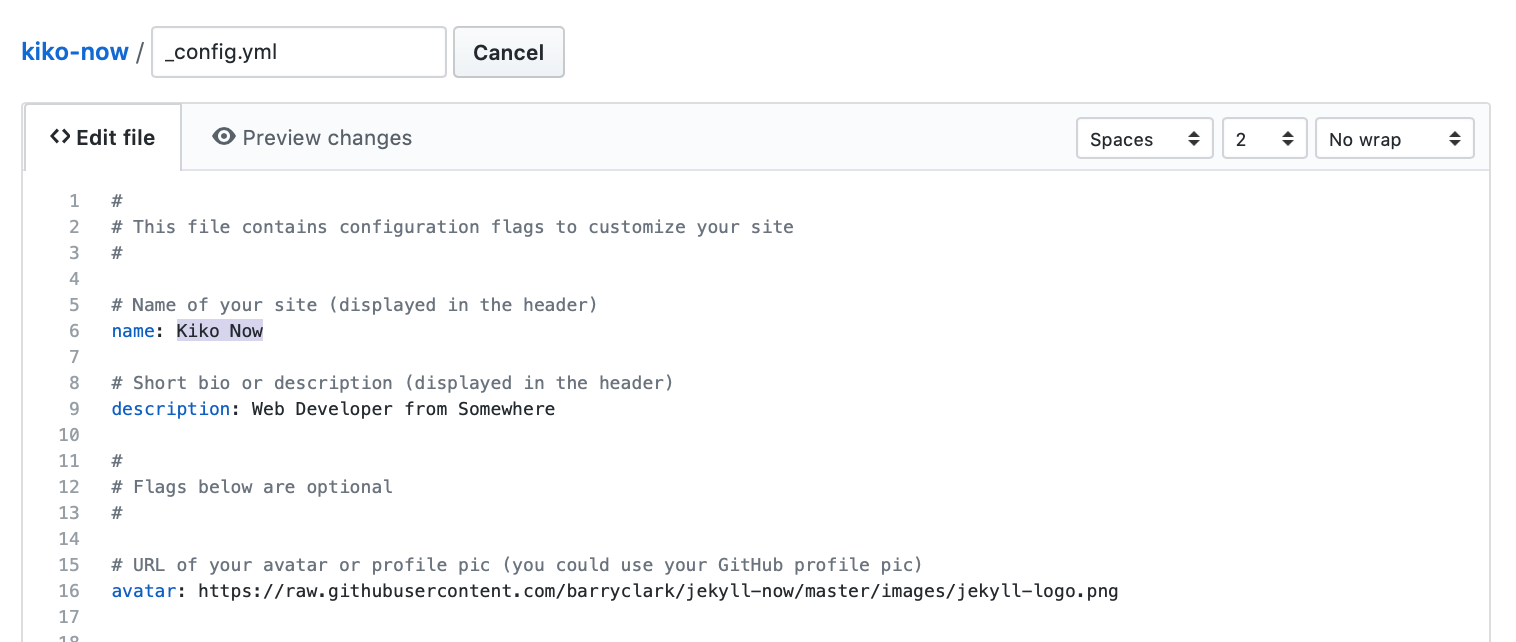
<p>데스크톱 앱(pywebview)과 웹 서버 모드(Flask + nginx), CLI까지 한 코드베이스에서 돌아가는 v1.0.0을 릴리스했습니다. 비공개 바이너리 포맷, 폰트 코드에 묻힌 텍스트, 폐쇄망 번역 같은 제약이 겹친 프로젝트였지만, “실제 파일로 일찍, 자주 검증한다”는 원칙 덕분에 잘못된 경로(DXF 변환)를 초반에 버릴 수 있었던 게 가장 컸습니다.</p>]]></content><author><name></name></author><category term="DWG" /><category term="Python" /><category term="LibreDWG" /><category term="번역" /><category term="프로젝트" /><summary type="html"><![CDATA[데이터센터 전기 도면은 대부분 AutoCAD의 .dwg 파일로 옵니다. 문제는 이 포맷이 비공개라는 것, 그리고 도면 안의 텍스트가 중국어라는 것이었습니다. “AutoCAD 없이, 오픈소스만으로 DWG를 읽고 → 중국어를 한국어로 번역하고 → 전압 같은 전기 구성까지 검증할 수 있을까?”라는 질문에서 시작한 프로젝트가 AttoGrid입니다.]]></summary></entry><entry><title type="html">You’re up and running!</title><link href="https://annayoon.github.io/hello-world/" rel="alternate" type="text/html" title="You’re up and running!" /><published>2017-10-08T00:00:00+09:00</published><updated>2017-10-08T00:00:00+09:00</updated><id>https://annayoon.github.io/hello-world</id><content type="html" xml:base="https://annayoon.github.io/hello-world/"><![CDATA[<p>Next you can update your site name, avatar and other options using the _config.yml file in the root of your repository (shown below).</p>

<p><img src="/images/config.png" alt="_config.yml" /></p>

<p>The easiest way to make your first post is to edit this one. Go into /_posts/ and update the Hello World markdown file. For more instructions head over to the <a href="https://github.com/aweekj/kiko-now">Kiko Now repository</a> on GitHub.</p>]]></content><author><name></name></author><category term="test" /><category term="tags" /><summary type="html"><![CDATA[Next you can update your site name, avatar and other options using the _config.yml file in the root of your repository (shown below).]]></summary></entry><entry><title type="html">A Full and Comprehensive Style Test</title><link href="https://annayoon.github.io/style-test/" rel="alternate" type="text/html" title="A Full and Comprehensive Style Test" /><published>2016-08-15T00:00:00+09:00</published><updated>2016-08-15T00:00:00+09:00</updated><id>https://annayoon.github.io/style-test</id><content type="html" xml:base="https://annayoon.github.io/style-test/"><![CDATA[<p>Below is just about everything you’ll need to style in the theme. Check the source code to see the many embedded elements within paragraphs.</p>

<hr />

<h2 id="1-header">1. Header</h2>

<h1 id="header-1">Header 1</h1>

<h2 id="header-2">Header 2</h2>

<h3 id="header-3">Header 3</h3>

<h4 id="header-4">Header 4</h4>

<h5 id="header-5">Header 5</h5>

<h6 id="header-6">Header 6</h6>

<h3 id="1-1-header-alignment">1-1. Header Alignment</h3>

<h5 id="leftdefault">Left(Default)</h5>

<h5 class="center" id="center">Center</h5>

<h5 class="right" id="right">Right</h5>

<h2 id="2-body-text">2. Body Text</h2>

<p>Lorem ipsum dolor sit amet, <a href="#">test link</a> adipiscing elit. <strong>This is strong.</strong> Nullam dignissim convallis est. Quisque aliquam. <em>This is emphasized.</em> Donec faucibus. Nunc iaculis suscipit dui. 5<sup>3</sup> = 125. Water is H<sub>2</sub>O. Nam sit amet sem. Aliquam libero nisi, imperdiet at, tincidunt nec, gravida vehicula, nisl. <u>Underline</u>. Maecenas ornare tortor. Donec sed tellus eget <code class="language-plaintext highlighter-rouge">COPY filename</code> sapien fringilla nonummy. Mauris a ante. Suspendisse quam sem, consequat at, <del>Dinner’s at 5:00.</del> commodo vitae, feugiat in, nunc. Morbi imperdiet augue <mark>mark element</mark> quis tellus.</p>

<h2 id="3-images">3. Images</h2>

<p><img src="http://placehold.it/800x400" alt="Large example image" title="Large example image" />
<img src="http://placehold.it/400x200" alt="Medium example image" title="Medium example image" />
<img src="http://placehold.it/200x200" alt="Small example image" title="Small example image" /></p>

<h3 id="3-1-image-alignment">3-1. Image Alignment</h3>
<p><img src="http://placehold.it/200x200" alt="Center example image" title="Center" class="center-image" /></p>

<h2 id="4-blockquotes">4. Blockquotes</h2>

<blockquote>
  <p>Lorem ipsum dolor sit amet, test link adipiscing elit. Nullam dignissim convallis est. Quisque aliquam.</p>
</blockquote>

<h2 id="5-list-types">5. List Types</h2>

<h3 id="unordered-list">Unordered List</h3>

<ul>
  <li>Lorem ipsum dolor sit amet, consectetur adipiscing elit.</li>
  <li>Nam ultrices nunc in nisi pellentesque ultricies. Cras scelerisque ipsum in ante laoreet viverra. Pellentesque eget quam et augue molestie tincidunt ac ut ex. Sed quis velit vulputate, rutrum nisl sit amet, molestie neque. Vivamus sed augue at turpis suscipit fringilla.</li>
  <li>Integer pretium nisl vitae justo aliquam, at varius nisi blandit.
    <ol>
      <li>Nunc vehicula nulla ac odio gravida vestibulum sed nec mauris.</li>
      <li>Duis at diam eget arcu dapibus consequat.</li>
    </ol>
  </li>
  <li>Etiam vel elit in purus iaculis pretium.</li>
</ul>

<h3 id="ordered-list">Ordered List</h3>

<ol>
  <li>Quisque ullamcorper leo non ex pretium, in fermentum libero imperdiet.</li>
  <li>Donec eu nulla euismod, rhoncus ipsum nec, faucibus elit.</li>
  <li>Nam blandit purus gravida, accumsan sem in, lacinia orci.
    <ul>
      <li>Duis congue dui nec nisi posuere, at luctus velit semper.</li>
      <li>Suspendisse in lorem id lacus elementum pretium nec vel nibh.</li>
    </ul>
  </li>
  <li>Aliquam eget ipsum laoreet, maximus risus vitae, iaculis leo.</li>
</ol>

<h3 id="definition-lists">Definition Lists</h3>

<dl>
  <dt>kramdown</dt>
  <dd>A Markdown-superset converter</dd>
  <dt>Maruku</dt>
  <dd>Another Markdown-superset converter</dd>
</dl>

<h2 id="6-tables">6. Tables</h2>

<table>
  <thead>
    <tr>
      <th style="text-align: left">Header1</th>
      <th style="text-align: center">Header2</th>
      <th style="text-align: right">Header3</th>
    </tr>
  </thead>
  <tbody>
    <tr>
      <td style="text-align: left">cell1</td>
      <td style="text-align: center">cell2</td>
      <td style="text-align: right">cell3</td>
    </tr>
    <tr>
      <td style="text-align: left">cell4</td>
      <td style="text-align: center">cell5</td>
      <td style="text-align: right">cell6</td>
    </tr>
  </tbody>
  <tbody>
    <tr>
      <td style="text-align: left">cell1</td>
      <td style="text-align: center">cell2</td>
      <td style="text-align: right">cell3</td>
    </tr>
    <tr>
      <td style="text-align: left">cell4</td>
      <td style="text-align: center">cell5</td>
      <td style="text-align: right">cell6</td>
    </tr>
  </tbody>
  <tfoot>
    <tr>
      <td style="text-align: left">Foot1</td>
      <td style="text-align: center">Foot2</td>
      <td style="text-align: right">Foot3</td>
    </tr>
  </tfoot>
</table>

<h2 id="7-code-snippets">7. Code Snippets</h2>

<h3 id="highlighted-code-blocks">Highlighted Code Blocks</h3>

<div class="language-css highlighter-rouge"><div class="highlight"><pre class="highlight"><code><span class="nf">#container</span> <span class="p">{</span>
  <span class="nl">float</span><span class="p">:</span> <span class="nb">left</span><span class="p">;</span>
  <span class="nl">margin</span><span class="p">:</span> <span class="m">0</span> <span class="m">-240px</span> <span class="m">0</span> <span class="m">0</span><span class="p">;</span>
  <span class="nl">width</span><span class="p">:</span> <span class="m">100%</span><span class="p">;</span>
<span class="p">}</span>
</code></pre></div></div>

<h3 id="standard-code-block">Standard code block</h3>

<div class="language-plaintext highlighter-rouge"><div class="highlight"><pre class="highlight"><code>&lt;div id="awesome"&gt;
  &lt;p&gt;This is great isn't it?&lt;/p&gt;
&lt;/div&gt;
</code></pre></div></div>]]></content><author><name></name></author><category term="test" /><category term="style" /><summary type="html"><![CDATA[Below is just about everything you’ll need to style in the theme. Check the source code to see the many embedded elements within paragraphs.]]></summary></entry><entry><title type="html">A Full and Comprehensive Style Test(Korean ver.)</title><link href="https://annayoon.github.io/style-test-ko/" rel="alternate" type="text/html" title="A Full and Comprehensive Style Test(Korean ver.)" /><published>2016-08-14T00:00:00+09:00</published><updated>2016-08-14T00:00:00+09:00</updated><id>https://annayoon.github.io/style-test-ko</id><content type="html" xml:base="https://annayoon.github.io/style-test-ko/"><![CDATA[<p>이 글은 스타일을 모아둔 것입니다. 소스 코드를 확인하여 스타일을 적용하는 방법을 알아보세요.</p>

<hr />

<h2 id="1-제목">1. 제목</h2>

<h1 id="제목-1">제목 1</h1>

<h2 id="제목-2">제목 2</h2>

<h3 id="제목-3">제목 3</h3>

<h4 id="제목-4">제목 4</h4>

<h5 id="제목-5">제목 5</h5>

<h6 id="제목-6">제목 6</h6>

<h3 id="1-1-제목-정렬">1-1. 제목 정렬</h3>

<h5 id="왼쪽기본">왼쪽(기본)</h5>

<h5 class="center" id="가운데">가운데</h5>

<h5 class="right" id="오른쪽">오른쪽</h5>

<h2 id="2-본문">2. 본문</h2>

<p>탄핵소추의 의결을 받은 자는 탄핵심판이 있을 때까지 <a href="#">링크</a> 그 권한행사가 정지된다. 제2항과 제3항의 처분에 대하여는 <strong>굵게</strong> 법원에 제소할 수 없다. 선거와 국민투표의 공정한 관리 <em>기울임</em> 및 정당에 관한 사무를 처리하기 위하여 5<sup>3</sup> = 125 선거관리위원회를 둔다. 국무총리는 대통령을 보좌하며, H<sub>2</sub>O 행정에 관하여 대통령의 명을 받아 행정각부를 통할한다. 정당은 법률이 정하는 바에 의하여 <u>밑줄</u> 국가의 보호를 받으며, 국가는 법률이 정하는 바에 의하여 <code class="language-plaintext highlighter-rouge">파일명</code> 정당운영에 필요한 자금을 보조할 수 있다. 모든 국민은 종교의 자유를 가진다. 국회의원은 법률이 정하는 직을 겸할 수 없다. 감사원은 <del>가운데 줄</del> 세입·세출의 결산을 매년 검사하여 대통령과 차년도국회에 <mark>형광펜</mark> 그 결과를 보고하여야 한다.</p>

<h2 id="3-이미지">3. 이미지</h2>

<p><img src="http://placehold.it/800x400" alt="큰 이미지" />
<img src="http://placehold.it/400x200" alt="중간 이미지" />
<img src="http://placehold.it/200x200" alt="작은 이미지" /></p>

<h3 id="3-1-이미지-가운데-정렬">3-1. 이미지 가운데 정렬</h3>
<p><img src="http://placehold.it/200x200" alt="이미지 가운데 정렬" class="center-image" /></p>

<h2 id="4-인용구">4. 인용구</h2>

<blockquote>
  <p>나는 헌법을 준수하고 국가를 보위하며 조국의 평화적 통일과 국민의 자유와 복리의 증진 및 민족문화의 창달에 노력하여 대통령으로서의 직책을 성실히 수행할 것을 국민 앞에 엄숙히 선서합니다. 모든 국민은 통신의 비밀을 침해받지 아니한다. 국회의원은 법률이 정하는 직을 겸할 수 없다. 국회는 헌법 또는 법률에 특별한 규정이 없는 한 재적의원 과반수의 출석과 출석의원 과반수의 찬성으로 의결한다. 가부동수인 때에는 부결된 것으로 본다.</p>
</blockquote>

<h2 id="5-리스트">5. 리스트</h2>

<h3 id="순서가-없는-리스트">순서가 없는 리스트</h3>

<ul>
  <li>국가원로자문회의의 조직·직무범위 기타 필요한 사항은 법률로 정한다.</li>
  <li>모든 국민은 법률이 정하는 바에 의하여 국방의 의무를 진다.</li>
  <li>탄핵소추의 의결을 받은 자는 탄핵심판이 있을 때까지 그 권한행사가 정지된다.
    <ol>
      <li>국회는 의원의 자격을 심사하며, 의원을 징계할 수 있다. 국가는 모성의 보호를 위하여 노력하여야 한다.</li>
      <li>공개하지 아니한 회의내용의 공표에 관하여는 법률이 정하는 바에 의한다.</li>
    </ol>
  </li>
  <li>국회는 의장 1인과 부의장 2인을 선출한다. 정부는 회계연도마다 예산안을 편성하여 회계연도 개시 90일전까지 국회에 제출하고, 국회는 회계연도 개시 30일전까지 이를 의결하여야 한다.</li>
</ul>

<h3 id="순서가-있는-리스트">순서가 있는 리스트</h3>

<ol>
  <li>대통령으로 선거될 수 있는 자는 국회의원의 피선거권이 있고 선거일 현재 40세에 달하여야 한다.</li>
  <li>각급 선거관리위원회는 선거인명부의 작성등 선거사무와 국민투표사무에 관하여 관계 행정기관에 필요한 지시를 할 수 있다.</li>
  <li>예비비는 총액으로 국회의 의결을 얻어야 한다. 예비비의 지출은 차기국회의 승인을 얻어야 한다.
    <ul>
      <li>국가는 농지에 관하여 경자유전의 원칙이 달성될 수 있도록 노력하여야 하며, 농지의 소작제도는 금지된다.</li>
      <li>모든 국민은 법률이 정하는 바에 의하여 납세의 의무를 진다.</li>
    </ul>
  </li>
  <li>형사피의자 또는 형사피고인으로서 구금되었던 자가 법률이 정하는 불기소처분을 받거나 무죄판결을 받은 때에는 법률이 정하는 바에 의하여 국가에 정당한 보상을 청구할 수 있다.</li>
</ol>

<h3 id="정의-리스트">정의 리스트</h3>

<dl>
  <dt>대통령은 제3항과 제4</dt>
  <dd>국회의원은 그 지위를 남용하여 국가·공공단체 또는 기업체와의 계약이나 그 처분에 의하여 재산상의 권리·이익 또는 직위를 취득하거나 타인을 위하여 그 취득을 알선할 수 없다.</dd>
  <dt>체포·구속·압수 또</dt>
  <dd>헌법개정안은 국회가 의결한 후 30일 이내에 국민투표에 붙여 국회의원선거권자 과반수의 투표와 투표자 과반수의 찬성을 얻어야 한다.</dd>
</dl>

<h2 id="6-표">6. 표</h2>

<table>
  <thead>
    <tr>
      <th style="text-align: left">상단1</th>
      <th style="text-align: center">상단2</th>
      <th style="text-align: right">상단3</th>
    </tr>
  </thead>
  <tbody>
    <tr>
      <td style="text-align: left">셀1</td>
      <td style="text-align: center">셀2</td>
      <td style="text-align: right">셀3</td>
    </tr>
    <tr>
      <td style="text-align: left">셀4</td>
      <td style="text-align: center">셀5</td>
      <td style="text-align: right">셀6</td>
    </tr>
  </tbody>
  <tbody>
    <tr>
      <td style="text-align: left">셀1</td>
      <td style="text-align: center">셀2</td>
      <td style="text-align: right">셀3</td>
    </tr>
    <tr>
      <td style="text-align: left">셀4</td>
      <td style="text-align: center">셀5</td>
      <td style="text-align: right">셀6</td>
    </tr>
  </tbody>
  <tfoot>
    <tr>
      <td style="text-align: left">하단1</td>
      <td style="text-align: center">하단2</td>
      <td style="text-align: right">하단3</td>
    </tr>
  </tfoot>
</table>

<h2 id="7-코드-스타일">7. 코드 스타일</h2>

<h3 id="코드-하이라이팅">코드 하이라이팅</h3>

<div class="language-css highlighter-rouge"><div class="highlight"><pre class="highlight"><code><span class="nf">#container</span> <span class="p">{</span>
  <span class="nl">float</span><span class="p">:</span> <span class="nb">left</span><span class="p">;</span>
  <span class="nl">margin</span><span class="p">:</span> <span class="m">0</span> <span class="m">-240px</span> <span class="m">0</span> <span class="m">0</span><span class="p">;</span>
  <span class="nl">width</span><span class="p">:</span> <span class="m">100%</span><span class="p">;</span>
<span class="p">}</span>
</code></pre></div></div>

<h3 id="일반적인-코드">일반적인 코드</h3>

<div class="language-plaintext highlighter-rouge"><div class="highlight"><pre class="highlight"><code>&lt;div id="awesome"&gt;
  &lt;p&gt;This is great isn't it?&lt;/p&gt;
&lt;/div&gt;
</code></pre></div></div>

<hr />

<p>이 문서는 <a href="http://guny.kr/stuff/klorem/">한글 Lorem Ipsum</a>으로 생성되었습니다.</p>]]></content><author><name></name></author><category term="샘플 포스트" /><category term="테스트" /><category term="스타일" /><summary type="html"><![CDATA[이 글은 스타일을 모아둔 것입니다. 소스 코드를 확인하여 스타일을 적용하는 방법을 알아보세요.]]></summary></entry><entry><title type="html">Turkish Character Support</title><link href="https://annayoon.github.io/turkish-support/" rel="alternate" type="text/html" title="Turkish Character Support" /><published>2016-08-13T00:00:00+09:00</published><updated>2016-08-13T00:00:00+09:00</updated><id>https://annayoon.github.io/turkish-support</id><content type="html" xml:base="https://annayoon.github.io/turkish-support/"><![CDATA[<p>This template also supports <a href="https://en.wikipedia.org/wiki/Wikipedia:Turkish_characters">Turkish Characters</a> as well.</p>

<table>
  <thead>
    <tr>
      <th style="text-align: center">Character</th>
      <th style="text-align: center">Description</th>
    </tr>
  </thead>
  <tbody>
    <tr>
      <td style="text-align: center">Ğ</td>
      <td style="text-align: center">Uppercase “G” with breve accent</td>
    </tr>
    <tr>
      <td style="text-align: center">İ</td>
      <td style="text-align: center">Uppercase dotted “I”</td>
    </tr>
    <tr>
      <td style="text-align: center">Ş</td>
      <td style="text-align: center">Uppercase “S” with cedilla</td>
    </tr>
    <tr>
      <td style="text-align: center">ğ</td>
      <td style="text-align: center">Lowercase “g” with breve accent</td>
    </tr>
    <tr>
      <td style="text-align: center">ı</td>
      <td style="text-align: center">Lowercase dotless “i”</td>
    </tr>
    <tr>
      <td style="text-align: center">ş</td>
      <td style="text-align: center">Lowercase “s” with cedilla</td>
    </tr>
  </tbody>
</table>]]></content><author><name></name></author><summary type="html"><![CDATA[This template also supports Turkish Characters as well.]]></summary></entry><entry><title type="html">Syntax Highlighting Post</title><link href="https://annayoon.github.io/code-highlighting-post/" rel="alternate" type="text/html" title="Syntax Highlighting Post" /><published>2015-08-16T00:00:00+09:00</published><updated>2015-08-16T00:00:00+09:00</updated><id>https://annayoon.github.io/code-highlighting-post</id><content type="html" xml:base="https://annayoon.github.io/code-highlighting-post/"><![CDATA[<p>Demo post displaying the various ways of highlighting code in Markdown.</p>

<p>Syntax highlighting is a feature that displays source code, in different colors and fonts according to the category of terms. This feature facilitates writing in a structured language such as a programming language or a markup language as both structures and syntax errors are visually distinct. Highlighting does not affect the meaning of the text itself; it is intended only for human readers.<sup id="fnref:1" role="doc-noteref"><a href="#fn:1" class="footnote" rel="footnote">1</a></sup></p>

<h3 id="highlighted-code-blocks">Highlighted Code Blocks</h3>

<p>To modify styling and highlight colors edit <code class="language-plaintext highlighter-rouge">/_sass/_highlighter.scss</code>.</p>

<div class="language-css highlighter-rouge"><div class="highlight"><pre class="highlight"><code><span class="nf">#container</span> <span class="p">{</span>
    <span class="nl">float</span><span class="p">:</span> <span class="nb">left</span><span class="p">;</span>
    <span class="nl">margin</span><span class="p">:</span> <span class="m">0</span> <span class="m">-240px</span> <span class="m">0</span> <span class="m">0</span><span class="p">;</span>
    <span class="nl">width</span><span class="p">:</span> <span class="m">100%</span><span class="p">;</span>
<span class="p">}</span>
</code></pre></div></div>

<div class="language-html highlighter-rouge"><div class="highlight"><pre class="highlight"><code><span class="nt">&lt;nav</span> <span class="na">class=</span><span class="s">"pagination"</span> <span class="na">role=</span><span class="s">"navigation"</span><span class="nt">&gt;</span>
    {% if page.previous %}
        <span class="nt">&lt;a</span> <span class="na">href=</span><span class="s">"{{ site.url }}{{ page.previous.url }}"</span> <span class="na">class=</span><span class="s">"btn"</span> <span class="na">title=</span><span class="s">"{{ page.previous.title }}"</span><span class="nt">&gt;</span>Previous article<span class="nt">&lt;/a&gt;</span>
    {% endif %}
    {% if page.next %}
        <span class="nt">&lt;a</span> <span class="na">href=</span><span class="s">"{{ site.url }}{{ page.next.url }}"</span> <span class="na">class=</span><span class="s">"btn"</span> <span class="na">title=</span><span class="s">"{{ page.next.title }}"</span><span class="nt">&gt;</span>Next article<span class="nt">&lt;/a&gt;</span>
    {% endif %}
<span class="nt">&lt;/nav&gt;</span><span class="c">&lt;!-- /.pagination --&gt;</span>
</code></pre></div></div>

<div class="language-ruby highlighter-rouge"><div class="highlight"><pre class="highlight"><code><span class="k">module</span> <span class="nn">Jekyll</span>
  <span class="k">class</span> <span class="nc">TagIndex</span> <span class="o">&lt;</span> <span class="no">Page</span>
    <span class="k">def</span> <span class="nf">initialize</span><span class="p">(</span><span class="n">site</span><span class="p">,</span> <span class="n">base</span><span class="p">,</span> <span class="n">dir</span><span class="p">,</span> <span class="n">tag</span><span class="p">)</span>
      <span class="vi">@site</span> <span class="o">=</span> <span class="n">site</span>
      <span class="vi">@base</span> <span class="o">=</span> <span class="n">base</span>
      <span class="vi">@dir</span> <span class="o">=</span> <span class="n">dir</span>
      <span class="vi">@name</span> <span class="o">=</span> <span class="s1">'index.html'</span>
      <span class="nb">self</span><span class="p">.</span><span class="nf">process</span><span class="p">(</span><span class="vi">@name</span><span class="p">)</span>
      <span class="nb">self</span><span class="p">.</span><span class="nf">read_yaml</span><span class="p">(</span><span class="no">File</span><span class="p">.</span><span class="nf">join</span><span class="p">(</span><span class="n">base</span><span class="p">,</span> <span class="s1">'_layouts'</span><span class="p">),</span> <span class="s1">'tag_index.html'</span><span class="p">)</span>
      <span class="nb">self</span><span class="p">.</span><span class="nf">data</span><span class="p">[</span><span class="s1">'tag'</span><span class="p">]</span> <span class="o">=</span> <span class="n">tag</span>
      <span class="n">tag_title_prefix</span> <span class="o">=</span> <span class="n">site</span><span class="p">.</span><span class="nf">config</span><span class="p">[</span><span class="s1">'tag_title_prefix'</span><span class="p">]</span> <span class="o">||</span> <span class="s1">'Tagged: '</span>
      <span class="n">tag_title_suffix</span> <span class="o">=</span> <span class="n">site</span><span class="p">.</span><span class="nf">config</span><span class="p">[</span><span class="s1">'tag_title_suffix'</span><span class="p">]</span> <span class="o">||</span> <span class="s1">'&amp;#8211;'</span>
      <span class="nb">self</span><span class="p">.</span><span class="nf">data</span><span class="p">[</span><span class="s1">'title'</span><span class="p">]</span> <span class="o">=</span> <span class="s2">"</span><span class="si">#{</span><span class="n">tag_title_prefix</span><span class="si">}#{</span><span class="n">tag</span><span class="si">}</span><span class="s2">"</span>
      <span class="nb">self</span><span class="p">.</span><span class="nf">data</span><span class="p">[</span><span class="s1">'description'</span><span class="p">]</span> <span class="o">=</span> <span class="s2">"An archive of posts tagged </span><span class="si">#{</span><span class="n">tag</span><span class="si">}</span><span class="s2">."</span>
    <span class="k">end</span>
  <span class="k">end</span>
<span class="k">end</span>
</code></pre></div></div>

<h3 id="standard-code-block">Standard Code Block</h3>

<div class="language-plaintext highlighter-rouge"><div class="highlight"><pre class="highlight"><code>&lt;nav class="pagination" role="navigation"&gt;
    {% if page.previous %}
        &lt;a href="{{ site.url }}{{ page.previous.url }}" class="btn" title="{{ page.previous.title }}"&gt;Previous article&lt;/a&gt;
    {% endif %}
    {% if page.next %}
        &lt;a href="{{ site.url }}{{ page.next.url }}" class="btn" title="{{ page.next.title }}"&gt;Next article&lt;/a&gt;
    {% endif %}
&lt;/nav&gt;&lt;!-- /.pagination --&gt;
</code></pre></div></div>

<h3 id="github-gist-embed">GitHub Gist Embed</h3>

<p>An example of a Gist embed below.</p>

<script src="https://gist.github.com/mmistakes/43a355923921d22cd993.js"></script>

<div class="footnotes" role="doc-endnotes">
  <ol>
    <li id="fn:1" role="doc-endnote">
      <p><a href="http://en.wikipedia.org/wiki/Syntax_highlighting">http://en.wikipedia.org/wiki/Syntax_highlighting</a> <a href="#fnref:1" class="reversefootnote" role="doc-backlink">&#8617;</a></p>
    </li>
  </ol>
</div>]]></content><author><name></name></author><category term="sample post" /><category term="code" /><category term="highlighting" /><summary type="html"><![CDATA[Demo post displaying the various ways of highlighting code in Markdown.]]></summary></entry><entry><title type="html">Testing Readability with a Bunch of Text</title><link href="https://annayoon.github.io/readability-post/" rel="alternate" type="text/html" title="Testing Readability with a Bunch of Text" /><published>2014-05-22T00:00:00+09:00</published><updated>2014-05-22T00:00:00+09:00</updated><id>https://annayoon.github.io/readability-post</id><content type="html" xml:base="https://annayoon.github.io/readability-post/"><![CDATA[<p>A ton of text to test readability.</p>

<p>Portland in shoreditch Vice, labore typewriter pariatur hoodie fap sartorial Austin. Pinterest literally occupy Schlitz forage. Odio ad blue bottle vinyl, 90’s narwhal commodo bitters pour-over nostrud. Ugh est hashtag in, fingerstache adipisicing laboris esse Pinterest shabby chic Portland. Shoreditch bicycle rights anim, flexitarian laboris put a bird on it vinyl cupidatat narwhal. Hashtag artisan skateboard, flannel Bushwick nesciunt salvia aute fixie do plaid post-ironic dolor McSweeney’s. Cliche pour-over chambray nulla four loko skateboard sapiente hashtag.</p>

<p>Vero laborum commodo occupy. Semiotics voluptate mumblecore pug. Cosby sweater ullamco quinoa ennui assumenda, sapiente occupy delectus lo-fi. Ea fashion axe Marfa cillum aliquip. Retro Bushwick keytar cliche. Before they sold out sustainable gastropub Marfa readymade, ethical Williamsburg skateboard brunch qui consectetur gentrify semiotics. Mustache cillum irony, fingerstache magna pour-over keffiyeh tousled selfies.</p>

<h2 id="cupidatat-90s-lo-fi-authentic-try-hard">Cupidatat 90’s lo-fi authentic try-hard</h2>

<p>In pug Portland incididunt mlkshk put a bird on it vinyl quinoa. Terry Richardson shabby chic +1, scenester Tonx excepteur tempor fugiat voluptate fingerstache aliquip nisi next level. Farm-to-table hashtag Truffaut, Odd Future ex meggings gentrify single-origin coffee try-hard 90’s.</p>

<ul>
  <li>Sartorial hoodie</li>
  <li>Labore viral forage</li>
  <li>Tote bag selvage</li>
  <li>DIY exercitation et id ugh tumblr church-key</li>
</ul>

<p>Incididunt umami sriracha, ethical fugiat VHS ex assumenda yr irure direct trade. Marfa Truffaut bicycle rights, kitsch placeat Etsy kogi asymmetrical. Beard locavore flexitarian, kitsch photo booth hoodie plaid ethical readymade leggings yr.</p>

<p>Aesthetic odio dolore, meggings disrupt qui readymade stumptown brunch Terry Richardson pour-over gluten-free. Banksy american apparel in selfies, biodiesel flexitarian organic meh wolf quinoa gentrify banjo kogi. Readymade tofu ex, scenester dolor umami fingerstache occaecat fashion axe Carles jean shorts minim. Keffiyeh fashion axe nisi Godard mlkshk dolore. Lomo you probably haven’t heard of them eu non, Odd Future Truffaut pug keytar meggings McSweeney’s Pinterest cred. Etsy literally aute esse, eu bicycle rights qui meggings fanny pack. Gentrify leggings pug flannel duis.</p>

<h2 id="forage-occaecat-cardigan-qui">Forage occaecat cardigan qui</h2>

<p>Fashion axe hella gastropub lo-fi kogi 90’s aliquip +1 veniam delectus tousled. Cred sriracha locavore gastropub kale chips, iPhone mollit sartorial. Anim dolore 8-bit, pork belly dolor photo booth aute flannel small batch. Dolor disrupt ennui, tattooed whatever salvia Banksy sartorial roof party selfies raw denim sint meh pour-over. Ennui eu cardigan sint, gentrify iPhone cornhole.</p>

<blockquote>
  <p>Whatever velit occaecat quis deserunt gastropub, leggings elit tousled roof party 3 wolf moon kogi pug blue bottle ea. Fashion axe shabby chic Austin quinoa pickled laborum bitters next level, disrupt deep v accusamus non fingerstache.</p>
</blockquote>

<p>Tote bag asymmetrical elit sunt. Occaecat authentic Marfa, hella McSweeney’s next level irure veniam master cleanse. Sed hoodie letterpress artisan wolf leggings, 3 wolf moon commodo ullamco. Anim occupy ea labore Terry Richardson. Tofu ex master cleanse in whatever pitchfork banh mi, occupy fugiat fanny pack Austin authentic. Magna fugiat 3 wolf moon, labore McSweeney’s sustainable vero consectetur. Gluten-free disrupt enim, aesthetic fugiat jean shorts trust fund keffiyeh magna try-hard.</p>

<h2 id="hoodie-duis">Hoodie Duis</h2>

<p>Actually salvia consectetur, hoodie duis lomo YOLO sunt sriracha. Aute pop-up brunch farm-to-table odio, salvia irure occaecat. Sriracha small batch literally skateboard. Echo Park nihil hoodie, aliquip forage artisan laboris. Trust fund reprehenderit nulla locavore. Stumptown raw denim kitsch, keffiyeh nulla twee dreamcatcher fanny pack ullamco 90’s pop-up est culpa farm-to-table. Selfies 8-bit do pug odio.</p>

<h3 id="thundercats-ho">Thundercats Ho!</h3>

<p>Fingerstache thundercats Williamsburg, deep v scenester Banksy ennui vinyl selfies mollit biodiesel duis odio pop-up. Banksy 3 wolf moon try-hard, sapiente enim stumptown deep v ad letterpress. Squid beard brunch, exercitation raw denim yr sint direct trade. Raw denim narwhal id, flannel DIY McSweeney’s seitan. Letterpress artisan bespoke accusamus, meggings laboris consequat Truffaut qui in seitan. Sustainable cornhole Schlitz, twee Cosby sweater banh mi deep v forage letterpress flannel whatever keffiyeh. Sartorial cred irure, semiotics ethical sed blue bottle nihil letterpress.</p>

<p>Occupy et selvage squid, pug brunch blog nesciunt hashtag mumblecore skateboard yr kogi. Ugh small batch swag four loko. Fap post-ironic qui tote bag farm-to-table american apparel scenester keffiyeh vero, swag non pour-over gentrify authentic pitchfork. Schlitz scenester lo-fi voluptate, tote bag irony bicycle rights pariatur vero Vice freegan wayfarers exercitation nisi shoreditch. Chambray tofu vero sed. Street art swag literally leggings, Cosby sweater mixtape PBR lomo Banksy non in pitchfork ennui McSweeney’s selfies. Odd Future Banksy non authentic.</p>

<p>Aliquip enim artisan dolor post-ironic. Pug tote bag Marfa, deserunt pour-over Portland wolf eu odio intelligentsia american apparel ugh ea. Sunt viral et, 3 wolf moon gastropub pug id. Id fashion axe est typewriter, mlkshk Portland art party aute brunch. Sint pork belly Cosby sweater, deep v mumblecore kitsch american apparel. Try-hard direct trade tumblr sint skateboard. Adipisicing bitters excepteur biodiesel, pickled gastropub aute veniam.</p>]]></content><author><name></name></author><category term="sample post" /><category term="readability" /><category term="test" /><category term="intro" /><summary type="html"><![CDATA[A ton of text to test readability.]]></summary></entry></feed>